Galit’s AI Lab · London · 2026
I learn AI by
building things
I actually want to use.
Experiments in AI, agents and automation — built around real problems at work, at home and everywhere in between.
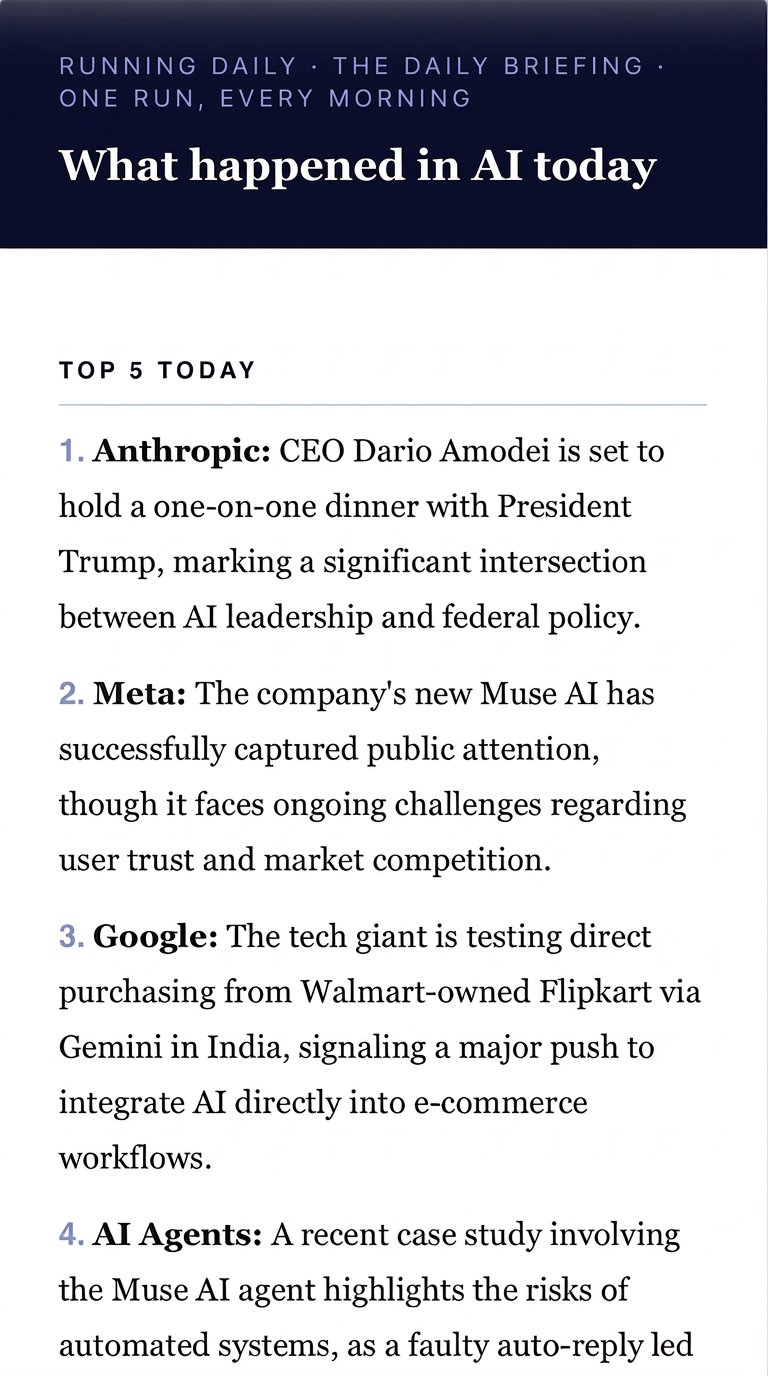
Running daily
N° 00 · The daily briefing · One run, every morning
Editorial system · Automation
What happened
in AI today
Every morning the system reads eight sources, identifies the five stories that matter, analyses why they matter and delivers the briefing straight to my inbox.
Ingestion, ranking, analysis, typesetting and delivery: one pipeline, one person, no manual steps between wake-up and inbox.
Tools in this build
- Gemini· analysis
- Google Apps Script· pipeline
- Gmail· delivery
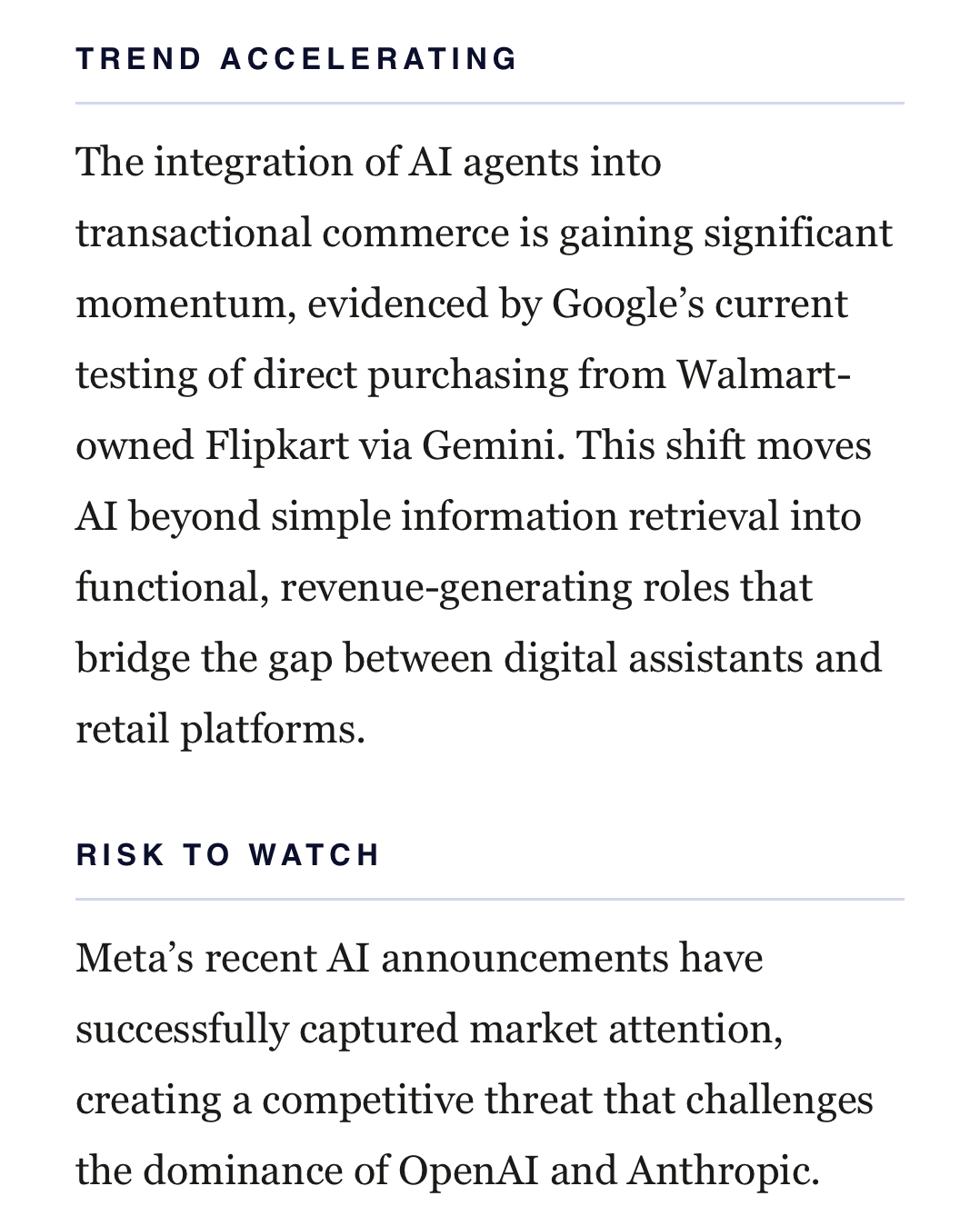
Supporting detail
Trends & risks
The briefing doesn’t stop at the headlines. A second structured pass looks across the day’s stories for the signal underneath: what’s accelerating, and what could break.
Behind the scenes
The loop
A fragment of the actual script that runs each morning.
var articles = fetchAllFeeds();

var articleDump = articles.map(function(a, i) {
  return '[' + (i+1) + '] SOURCE: ' + a.source +
    '\nTITLE: ' + a.title +
    '\nURL: ' + a.link +
    '\nSUMMARY: ' + a.desc;
}).join('\n\n---\n\n');

var top5Text = getTop5(apiKey, articleDump, dateStr);
var restText = getRestOfBriefing(apiKey, articleDump, dateStr);

var fullBriefing = 'TOP 5 TODAY\n\n' + top5Text + '\n\n' + restText;
var htmlBody = buildHtmlEmail(fullBriefing, dateStr);

GmailApp.sendEmail(RECIPIENT_EMAIL, subject, fullBriefing, {
  htmlBody: htmlBody,
  name: SENDER_NAME
});
8 RSS FEEDS → FILTER → GEMINI ANALYSIS → STRUCTURED BRIEFING → GMAIL
AI Advisor
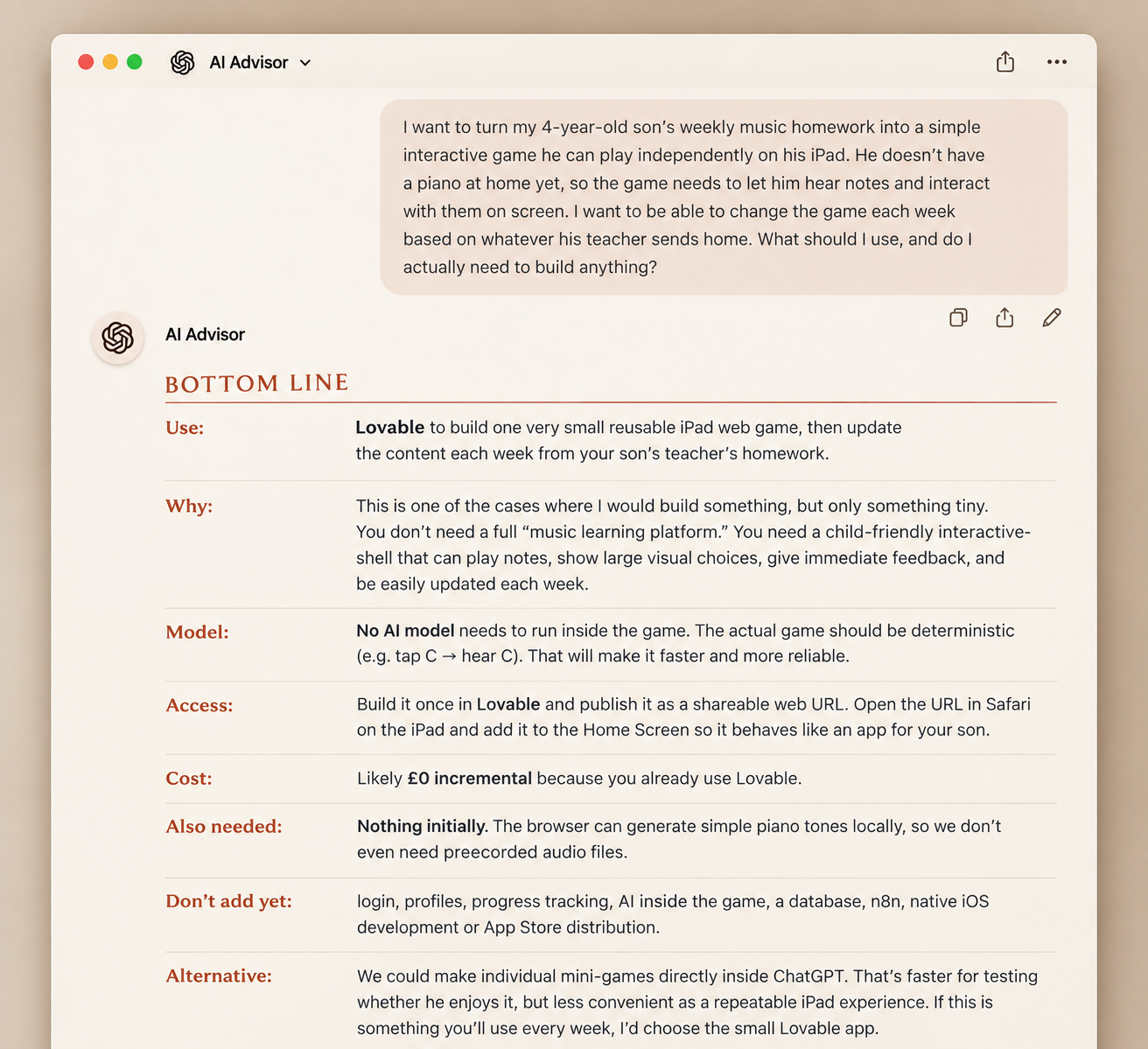
N° 01 · Tool & build advisor · Built in ChatGPT
Decision design · Personal system
Before I
build anything,
I ask this.
My AI Advisor knows my stack, understands what each tool is good at, and helps me choose the simplest way to turn an idea into something that works — without adding technology I don't need.
Tool selection · Stack awareness · Current research · System design · Human approval
Tools in this build
- ChatGPT· instructions + context
How it works
- Outcome→
- Clarify→
- Check my stack→
- Choose tools→
- Recommend→
- Approval→
- Implement→
- Test
↳ Research — invoked whenever current information is needed
The answer is the output. The system for reaching it is the interesting part.
Under the hood
Operating principles
A curated excerpt from the Advisor's actual instructions.
- 01“Prefer the simplest solution that reliably works.”
- 02“Always check whether my existing stack can accomplish the outcome sufficiently well.”
- 03“Before adding tools, subscriptions, APIs, MCP, automation, databases, agents or code, ask what requirement makes them necessary.”
- 04“Do not build custom software, agents, databases or MCP simply because they are possible.”
- 05“Do NOT begin implementation until I explicitly approve the recommendation.”
STACK → REQUIREMENT → TOOL → ARCHITECTURE → HUMAN DECISION
Agentic system · Home life
Can I build anoperating systemfor family life?
I’m experimenting with a small team of AI agents to take on the invisible operational load behind family life — inbox, tasks, bookings, research and everything in between.
The goal isn’t to automate my family. It’s to find out what can be delegated without giving up judgement or control.
- 01Chief of Familycoordinates
- 02Inbox & Email Managementtriages
- 03Chief of Tasksprioritises
- 04Product Managerdesigns
- 05Restaurant Conciergeresearches / books
Status · In development
Currently testing · Orchestration · Specialist agents · Memory · Human approval
Currently building with
- Grokbot
Architecture
Multi-agent orchestration
What I’m testing
Can one coordinating agent understand what needs doing, hand work to specialist agents, keep enough context across family life, and know when it needs me?
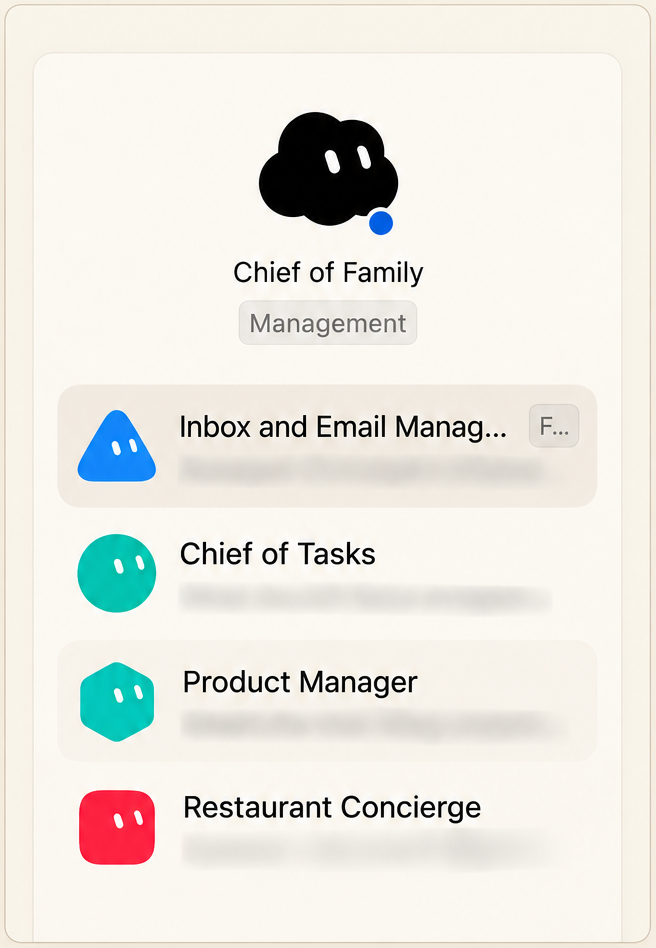
Current build · Live agent roster
The current roster inside Grokbot — still evolving as I test which responsibilities genuinely benefit from specialist agents.
Me the human
↓
Chief of Family delegates · remembers · escalates
↓
Inbox · Tasks · Concierge · Other specialists
Current state
Working
- ✓Inbox triage and recurring cleanup
- ✓Task prioritisation
- ✓Specialist hand-offs
Still figuring out
- ○Reliable shared context
- ○What belongs in memory vs external state
- ○Cross-agent coordination
- ○Where human approval belongs
- ○Whether multiple agents are actually better than one
This one isn’t finished.That’s the point.
Automation · Personal operations
Can I make my inboxmanage itself?
My inbox had become another to-do list. I built a system that clears the noise automatically, protects what matters, and leaves me with the emails that actually need my attention.
Inbox
↓
Triage
↓
Archive noise · Keep important · Surface action
↓
Clean inbox
What gets automated — and what doesn’t.
The system handles high-confidence, repetitive work. I stay responsible for anything consequential or ambiguous.
Automatic
- ✓Archive newsletters + low-value noise
- ✓Clear routine notifications
- ✓Surface urgent emails immediately
- ✓Draft replies when the response is straightforward
- ✓Run inbox clean-ups twice daily
Stays with me
- ○Send consequential replies
- ○Ambiguous decisions
- ○Sensitive conversations
- ○Anything where the system isn’t confident
The goal isn’t zero email. It’s zero unnecessary attention.
Dashboard · Family operations
Can one screen tell mehow our family weekactually works?
Our calendars contain everything. But a calendar isn’t the same thing as understanding the week. I’m building a weekly family operating view that filters the noise, surfaces what matters, and shows us what actually needs coordinating.
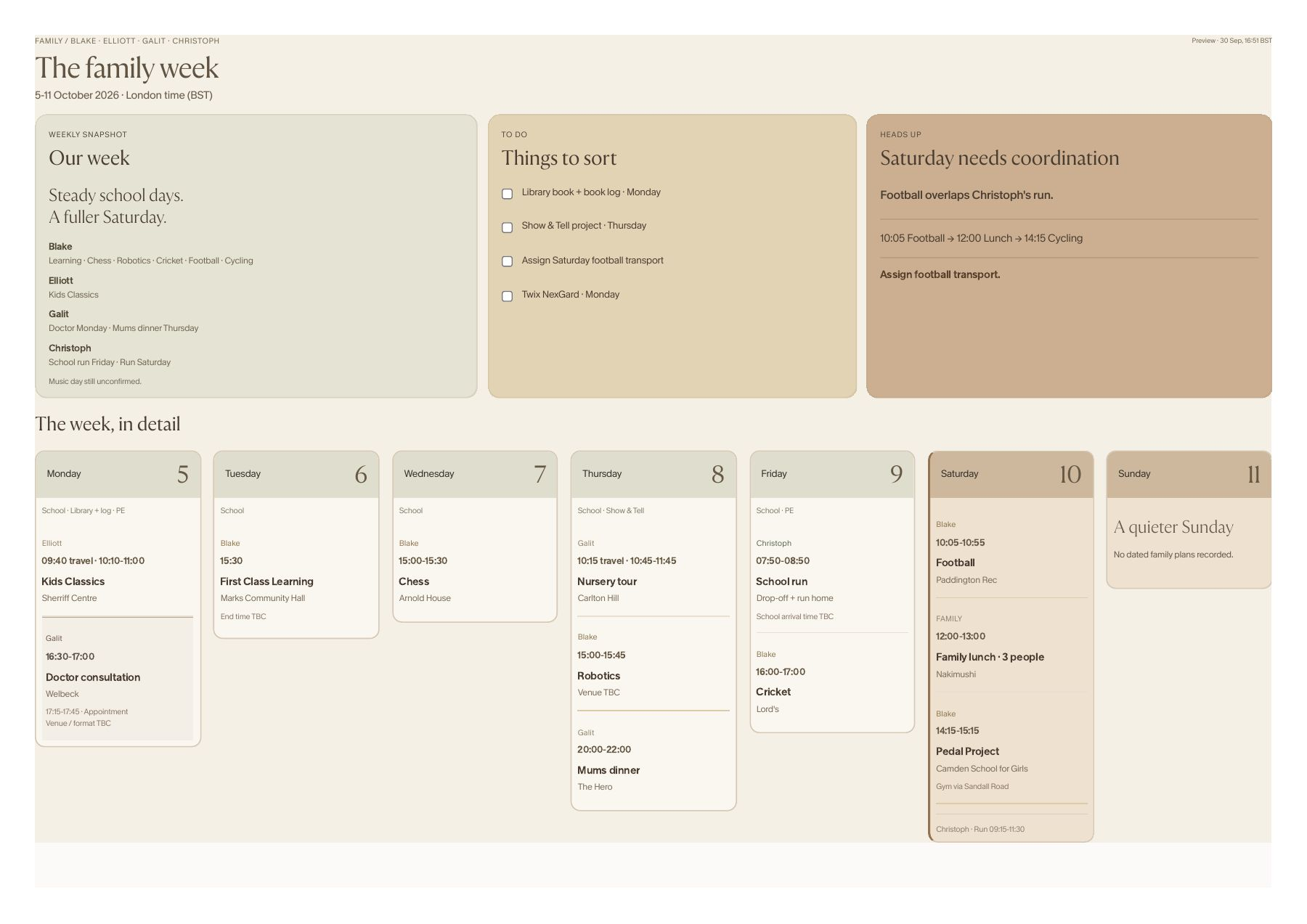
A calendar tells me what is booked.
I want to know what the week means.
01 — Filter
Remove events that don’t affect family operations.
02 — Surface
Bring school, childcare, appointments, activities and family commitments into one view.
03 — Anticipate
Identify things to sort, potential conflicts and moments that need coordination before the week begins.
Status · In development
Currently testing · Calendar filtering · Prioritisation · Conflict detection · Weekly summaries
The toolbox
What I’m actually
building with.
- 01ChatGPTAI Advisor · reasoning
- 02Claudebuilding · coding
- 03Instinctpersonal automation
- 04Geminianalysis
- 05GrokbotFamily OS · multi-agent
- 06Google Apps Scriptautomation
- 07Gmaildelivery
- 08Lovableweb building
A note from Galit
I don’t want to just understand
what AI can do.
I want to find out
what I can do with it.
Still figuring it out.
That’s the fun part.
AI · Automation · Agents · Whatever I get curious about next